Email Marketing
Email Marketing from your own domain, on-brand and tracked
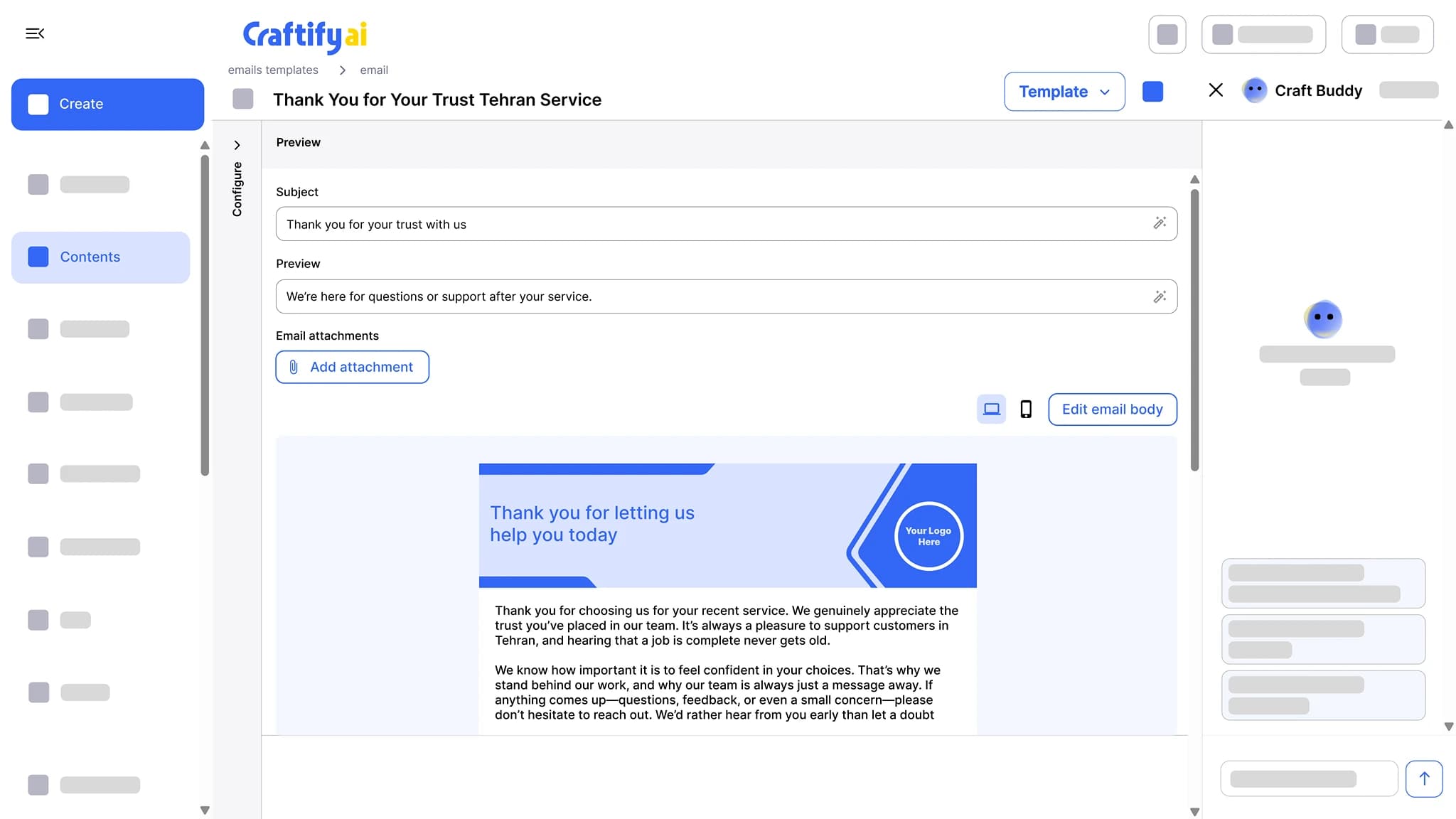
Design the email by dragging blocks into place, fill it with values from your brand profile and from each contact, and send it from your own domain with no Craftify branding. See who opened and who clicked, contact by contact.
Drag-and-drop designer
Sends from your domain
Opens and clicks per contact
Most small business email goes out from a tool that screams marketing.
You set up Mailchimp, send from a generic address, and the email lands in promotions or worse. Replies go back to a tool you do not check. Open rates drop and you cannot tell why.
Sending from a generic marketing address that lands in the promotions tab.
Reading reports without knowing which contacts actually opened or clicked.
Paying for a separate email tool that does not know your CRM.
See email that sends from your brand and tracks per contact →
Why owners pick the Craftify Email tool
A designer that knows your brand and your contacts, sending from your domain, with every open and click tied back to the contact in your CRM.
Your domain, your sender, your reply-to
Connect your domain once and set the sender name, signature, and reply-to. The Maximize delivery setting warms the domain up gradually, and non-working addresses are removed on their own to protect your domain reputation. No Craftify branding anywhere.
A designer that knows your brand and your contacts
Drag blocks into place, drop in smart values from your brand profile and from each recipient’s contact record, and hide any block on mobile. Save the result as a template, or start from the template galleries.
Tracked per contact, tied to automations
Every open and link click logs against the contact in your CRM. Action links record the answer a customer gives, and any email action can start an automation, such as a review request follow-up.
Design it, send it from your domain, see who opened
The designer, the domain setup, segment sends, scheduling, and per-contact results, in one tool.
What it does
From a template to a tracked send
The email editor, the contacts and segments it sends to, and the automations that send emails on their own.
Write the subject line, preview text, and a branded email body, then send from your own domain with no Craftify branding on it. Opens and clicks are tracked per contact.
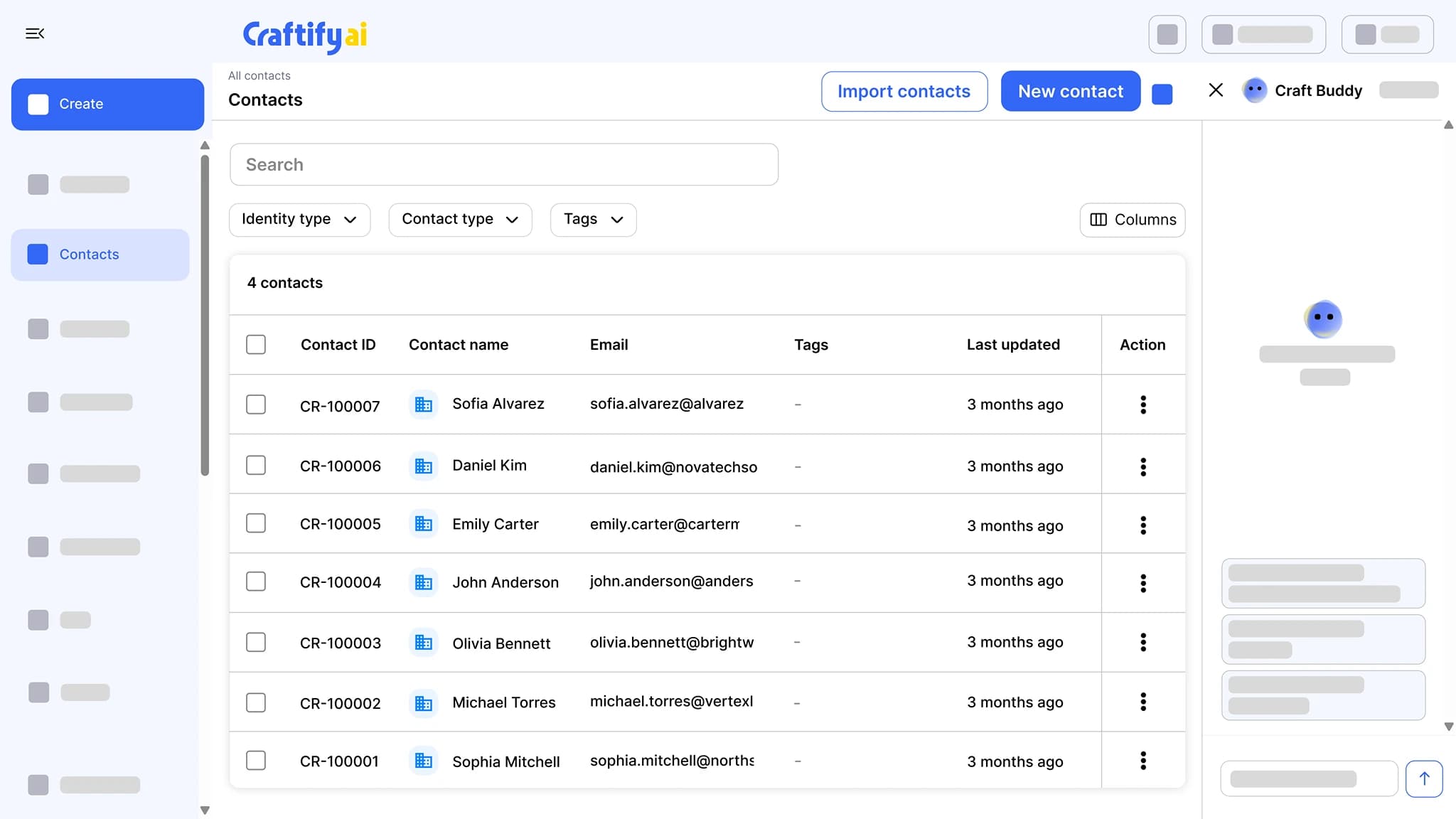
Import from CSV, QuickBooks, or Shopify, or let your website lead forms add contacts for you. Tag, segment, add notes, and move leads through pipelines that trigger follow-ups.
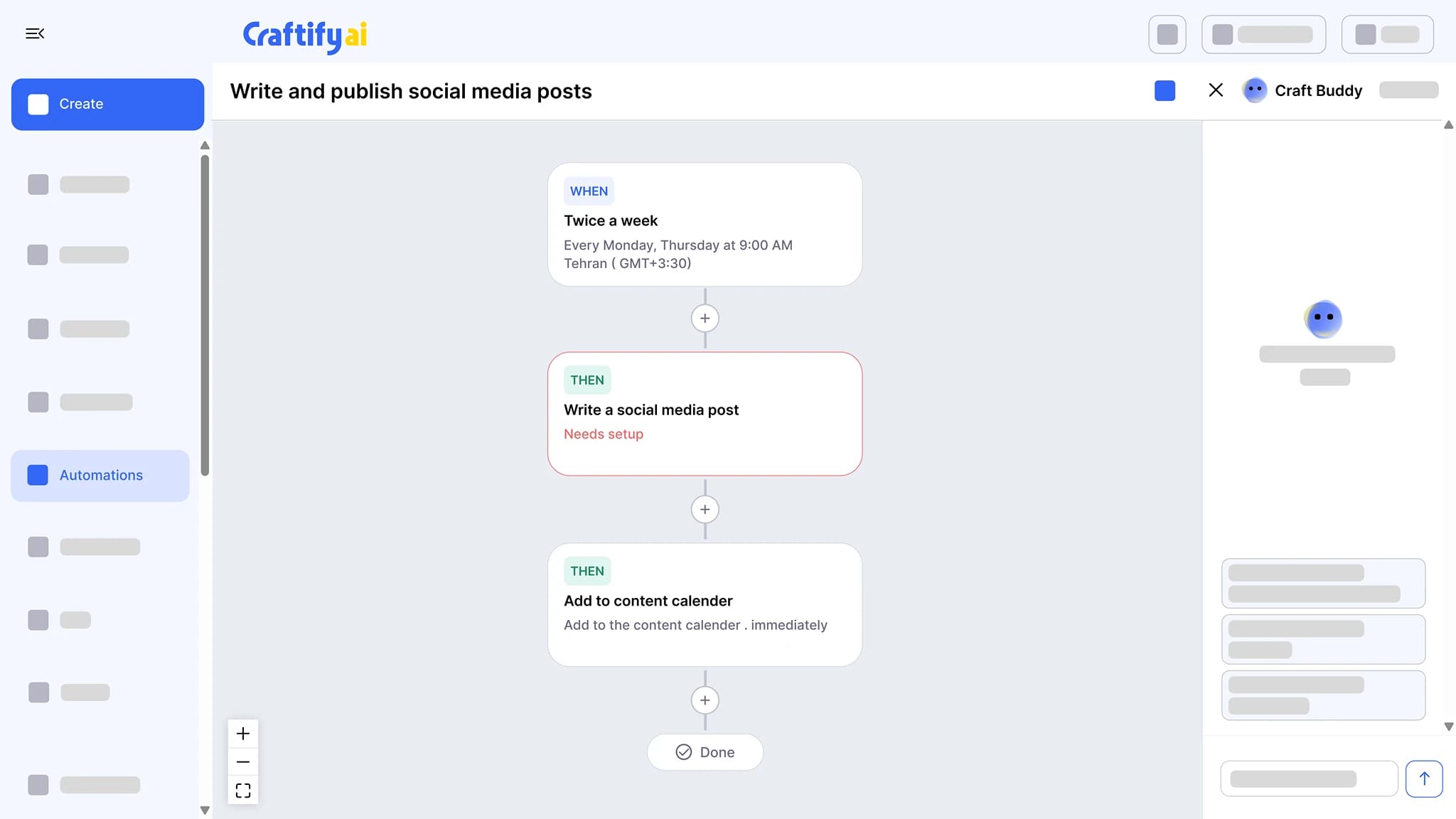
See the CRMChain a trigger to actions: write a social post twice a week and add it to the calendar, send a birthday email, or follow up after a job. Set the schedule once and approve what it drafts.
See marketing automation
Want help connecting your domain? Book a quick demo with our team.
How it works
Connect, design, send. Reports and automations are tied in by default.
1
Connect your domain
Connect your business domain once and set the sender name, signature, and reply-to. Turn on Maximize delivery and Craftify warms the domain up gradually so more of your sends get delivered.
2
Design or pick a template
Start from a template gallery or a blank canvas, drag blocks into place, and add smart values from your brand profile and contact fields. Hide a block on mobile if it does not fit. Save it as a template for next time.
3
Send to a segment, track results
Send to one contact or a CRM segment, now or on a schedule. Opens and link clicks log against each contact, and non-working addresses drop out automatically.
Ready to send from your own brand?
Frequently asked questions
Email Marketing in Craftify AI is a drag-and-drop email designer and sender: you design the email with values from your brand profile and each contact, send it from your own domain with no Craftify branding, and see who opened and clicked, contact by contact.
Yes. Connect your business domain once and set the sender name, signature, and reply-to. The Maximize delivery setting warms the domain up gradually, and there is no Craftify branding on anything you send.
Drag blocks into place, then fill them with smart values from your brand profile (logo, business name, social links) and from each recipient’s contact record. Hide any block on mobile, save the design as a template, or start from the template galleries.
Yes. Send to a single contact or to a segment, now or scheduled for later. Opens and link clicks log against each contact, so the next send can go to the people who engaged, and scheduled emails show on the content calendar.
An action link records the answer a customer gives, on their contact record, when they click it. That answer can start an automation. A review request is built this way: the customer taps the link in the email, and the automation sends the follow-up with your Google review link.
No. Craftify removes non-working addresses automatically to protect your domain reputation, and the email report shows what was not delivered.